> ## Documentation Index
> Fetch the complete documentation index at: https://docs.logictwelve.com/llms.txt
> Use this file to discover all available pages before exploring further.
# Usage
> Use Apiary Embed for Confluence day to day
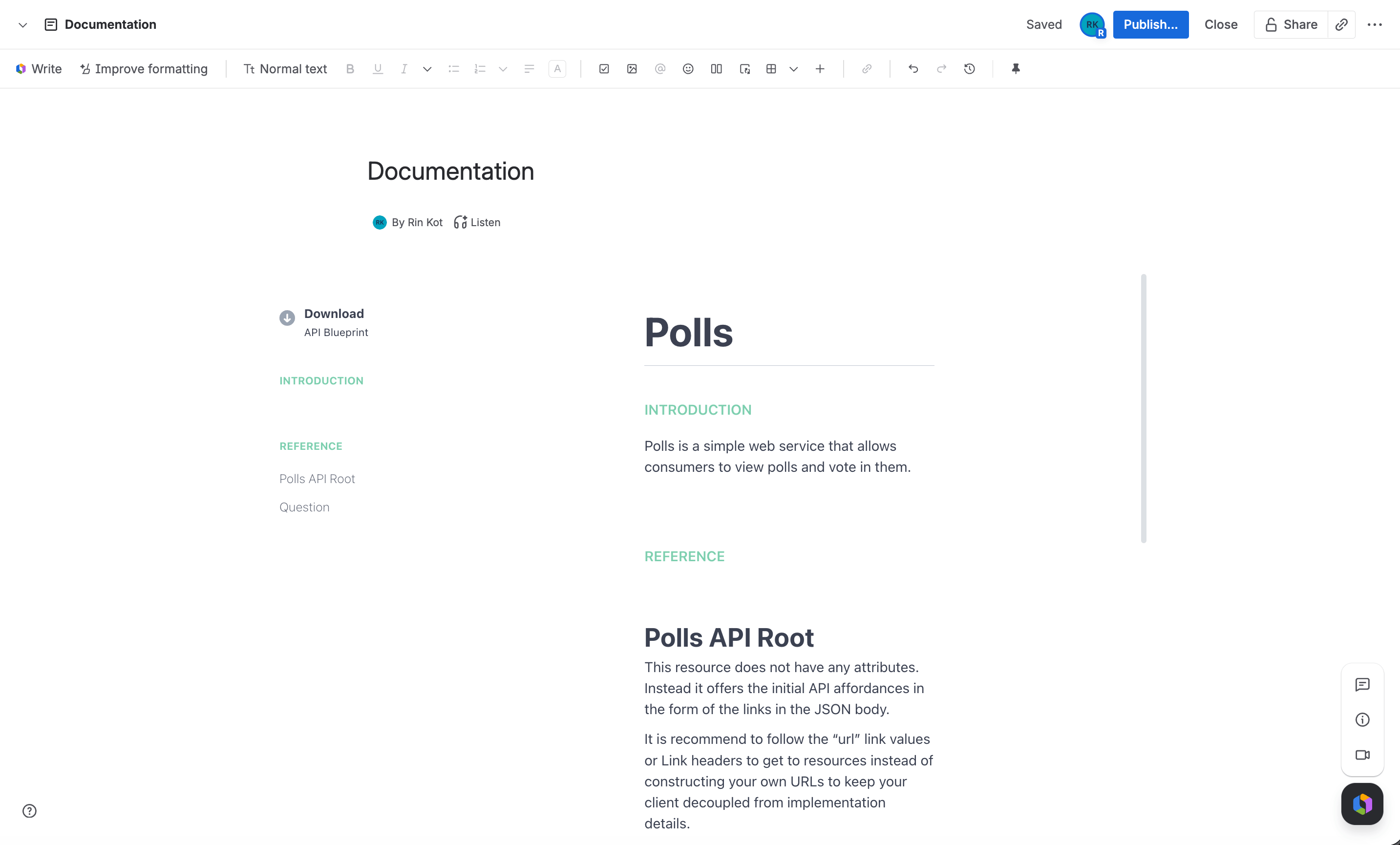
Page viewers see the Apiary API Project rendered in place — a human-readable column, a machine column with the raw API Blueprint, and a request console — with no Confluence-specific chrome around it.
If the macro doesn't have a usable configuration yet, viewers see a configuration warning instead. If the site doesn't have an active license, they see a license warning instead — see [Licensing](#licensing).
## Choosing a macro
There are two macros to choose between:
* **Apiary Embed (raw code)** — paste the exact embed script Apiary generates for you (`var embed = new Apiary.Embed({...});`). Use this when you need options that aren't exposed by the generate form, or you're reusing a script you already have.
* **Apiary Embed (generate code)** — provide the API Project subdomain and toggle display options in a form, without writing any code. Use this for the common case.
## Adding the macro to a page
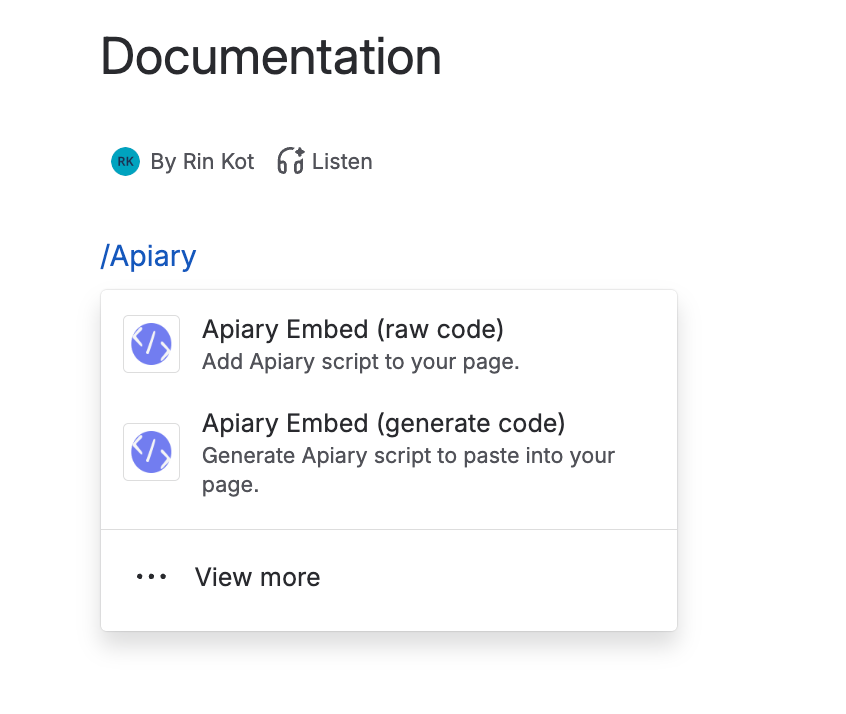
While editing a page, type `/` or click the **+** in the editing toolbar.
Search for "Apiary" and select **Apiary Embed (raw code)** or **Apiary Embed (generate code)**:
 Fill in the config form — see [Configuration](/apiary-confluence/configuration) for every field.
Click **Save** on the macro, then save the page to make the rendered documentation visible to viewers. Here's how the macro looks once published:
Fill in the config form — see [Configuration](/apiary-confluence/configuration) for every field.
Click **Save** on the macro, then save the page to make the rendered documentation visible to viewers. Here's how the macro looks once published:
 ## Keeping it updated
Both macros render the Apiary API Project live, in an iframe served by Apiary, every time someone views the page. There's nothing to republish — if you update the API Project in Apiary, the change shows up the next time the page loads.
## Licensing
The app uses Confluence's built-in Marketplace licensing. If a site doesn't have an active license or trial, every instance of either macro shows a license warning instead of rendering.
## Tips
Use **Apiary Embed (raw code)** instead, and paste the exact embed script from Apiary's own embed generator.
Confluence pages default to a fixed width. Use the page options menu to switch the page to **Go wide** or **Go full width** instead of changing the macro's own settings.
Increase the **Height** field on the macro — it sets a fixed iframe height, so content taller than that value is clipped rather than scrolled.
## Keeping it updated
Both macros render the Apiary API Project live, in an iframe served by Apiary, every time someone views the page. There's nothing to republish — if you update the API Project in Apiary, the change shows up the next time the page loads.
## Licensing
The app uses Confluence's built-in Marketplace licensing. If a site doesn't have an active license or trial, every instance of either macro shows a license warning instead of rendering.
## Tips
Use **Apiary Embed (raw code)** instead, and paste the exact embed script from Apiary's own embed generator.
Confluence pages default to a fixed width. Use the page options menu to switch the page to **Go wide** or **Go full width** instead of changing the macro's own settings.
Increase the **Height** field on the macro — it sets a fixed iframe height, so content taller than that value is clipped rather than scrolled.